
The UX Files: Semantic HTML
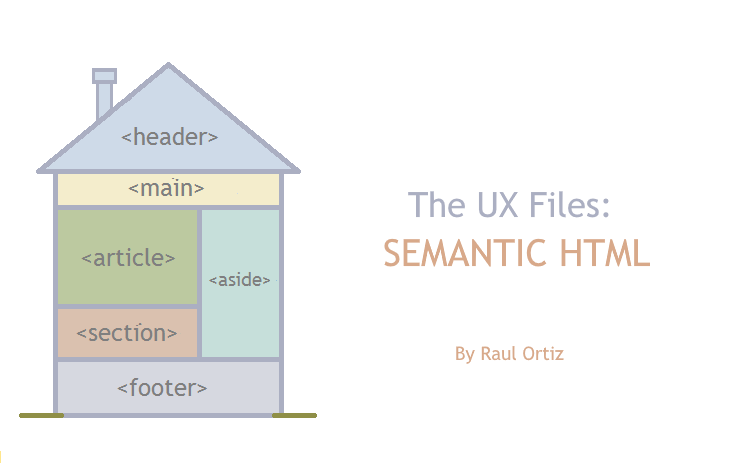
In today’s fast-paced world of web development, building apps that are solid, accessible, and easy to maintain is super important. We often get caught up in making things look good, but the actual bones of our web pages – the HTML – is an often overlooked part of the puzzle.
The <div> Soup
Div Soup: Image generated with Google Gemini Flash 2.5
In the early days of the internet a chaotic practice I call “table hell” emerged. During this era, the <table> tag was widely used for website layout and design. Dealing with tables, within tables, within tables, was a common mess back then.
Fast forward to the present and tables have fallen out of favor, even for their originally intended purpose. Web designers and developers, it seems, have found a new tag to misuse: the <div>.
CSS and frameworks like Tailwind offer developers extensive control over <div> elements. This flexibility, while beneficial for design and development efficiency, often comes with notable accessibility downsides that warrant careful consideration. The ease with which <div> elements can be styled and repurposed can lead to semantic ambiguities and a lack of proper structure for assistive technologies.
“Div soup,” despite its name, is far from a culinary delight. In fact, it is detrimental to the overall HTML structure. Here’s a couple examples of <div> misuse:
Button / Link Replacement
Using a <div> element and then applying all the necessary behaviors to make it function like a <button> or a link (<a>) requires significantly more effort than the potential benefits it might offer.
<div class="cool-button" onClick="coolAction()">

  Cool Action!

</div>
Side note: Using a link tag (<a>) to simulate a <button> (and viceversa) are also poor HTML decisions. 👀
Structural Problems
Many contemporary websites and applications often employ a similar or slightly altered version of the code provided below.
<body>

  <div class="header"> ... </div>

  <div class="main"> ... </div>

  <div class="footer"> ... </div>

</body>
Fortunately, this and many other misuses can be corrected by either utilizing appropriate elements or assigning suitable roles to the <div> tags; i.e., Semantic HTML.
It Isn’t “Just Semantics”
Semantic HTML is one of the core principles of accessibility (a11y.) In short, it means using HTML tags and attributes to specify what the content means, not just how it should look.
Throwing a <header> tag around the page’s intro, a <nav> tag for the main menu, an <article> for a self-contained piece of content, and a <footer> for, well, the footer, are all examples of semantic usage of HTML tags. If a plain old <div> tag was used for all those things (which, technically, it can be done), we’d totally miss out on the meaning part.
Taking a little bit of time to think about semantics before going for the <div> can have big benefits:
- Makes content accessible to everyone
Assistive technology like screen readers, totally rely on semantic structure to understand and share information. Without semantics, assistive technology would serve a jumbled mess of text, making your app practically unusable. And we all know accessibility is important. - Search engines can index the content more efficiently
Google and other search engines use sophisticated algorithms to crawl and index web content. Semantic HTML gives these algorithms clear hints about what your page is all about. The payoff? Better indexing and higher search rankings. - Free default styles and behaviors
All web browsers come with a default set of style rules that are automatically applied to some HTML elements. Headings (like <h1>, <h2>) are typically rendered with larger, bolder fonts with inherent margins to create visual separation between elements. The dialog tag (<dialog>) allows for native modal and non-modal panels, and the details tag (<details>) provides an easy way to display collapsible content. Be aware that some CSS frameworks automatically override some default styling rules. - Content structure and readability
Semantic tags naturally help create a more organized and logical structure. This means cleaner, more readable code that’s a breeze to manage. Instead of having a bunch of <div> tags with custom classes and comments to try and convey meaning, semantic elements and attributes can help identify what’s what. Less head-scratching, more approachable code.
Semantic Essentials
By combining semantic HTML tags with their appropriate attributes, developers can create web content that is not only visually presentable but also meaningful to browsers, search engines, and assistive technologies.
HTML Tags
HTML5 provides a wide range of elements to create a feature rich yet semantically sound structure:
- <header>: The opening content, usually contains navigation, your brand, or headings.
- <nav>: A section just for navigation links.
- <main>: The most important content of your page’s <body>.
- <article>: Self-contained composition in a document.
- <section>: A standalone section within your document.
- <aside>: Portion of a document indirectly related to the document’s main content.
- <footer>: The closing content for its closest section or the whole page.
- <figure>: Self-contained content like images or charts, with an optional caption.
- <figcaption>: A caption or label for the <figure> element.
- <details>: A clickable widget that shows or hides extra info.
- <summary>: A title or legend for the <details> element.
- <time>: Represents a specific point or duration in time.
For a full reference please visit MDN’s HTML elements reference.
HTML Attributes and Properties
Semantic HTML goes beyond merely utilizing appropriate tags; it also involves the strategic use of attributes and properties. While tags provide structural meaning to content, attributes and properties offer an additional layer of detail and context that further enhances the semantic value of these elements.
Some notable attributes and properties that contribute to semantic meaning include:
- aria-*: ARIA (Accessible Rich Internet Applications) attributes provide additional semantic information to assistive technologies, especially for dynamic content and custom UI components that might not have inherent HTML semantics. They can define roles, states, and properties of elements, making web applications more accessible.
- role: WAI-ARIA Roles provide semantic meaning to content, allowing screen readers and other tools to present and support interaction with an object in a way that is consistent with user expectations of that type of object.
- rel: Used with <link> and <a> tags, rel defines the relationship between the current document and the linked document. Examples include stylesheet for CSS files, nofollow for indicating that a linked page should not pass on link equity, or prev/next for pagination.
- cite: Used with <blockquote> and <q> elements, cite provides a URL to the source of the quotation, adding important attribution and context.
- datetime: For the <time> element, this attribute provides a machine-readable format of a date or time, which can be useful for search engines and other applications, even if the human-readable text is formatted differently.
- lang: This attribute can be applied to any HTML element (though most commonly to the <html> tag) to declare the primary language of the element’s content. This is essential for accessibility and internationalization.
What If…
There will always be edge cases and constraints when it comes to include a new variable to your development life cycle. But there is almost always a compelling reason to advocate for proper HTML structure. Let’s explore a few scenarios:
Component Based Development
“The project I’m working on is using component based technology. Each component can be used in a wide variety of scenarios. It’s hard to know when and how to use semantics.”
While implementing semantic HTML for a single document (as a whole) feels more straightforward, semantic principles remain true for isolated chunks of HTML. For instance, when developing a component for a view’s top section, utilize the <header> as the root element for your component. Similarly, a toolbar or a collection of actions for a specific entity should employ the <menu> element.
Semantic Element Breaks Layout
“We’re trying to build a table that is not rendering correctly when we use the <table> element. The designer and the development team have agreed to use custom grid styles with divs to make the layout work.”
There are certain HTML elements that unfortunately have rendering artifacts we don’t usually want in the final product. Certain elements, like <table>, <select>, and some <input> types, are hard to fully customize with CSS alone. There will be situations where the use of natively non-semantic alternatives, like the <div>, will be inevitable. ARIA attributes and roles can help your team overcome these occasional scenarios. Continue reading for an AI-assisted example that addresses the aforementioned <table> scenario.
Legacy Code
“The codebase for the project we started working on is huge and pretty much established. It feels like an overwhelming task to even start moving in the semantic direction.”
It’s highly likely that incremental enhancements are still ongoing on a project with developers on its roster. You can gradually improve the HTML structure through small, deliberate steps. Simple changes, like adding an ARIA attribute or substituting a <div> with a more semantically appropriate element, contribute to this progress. Furthermore, your modifications might initiate productive discussions with other team members.
Standards & Conventions
“My project has defined coding standards, and there’s a tendency of favoring consistency of official and non-official (conventional) standards when we work on the code.”
Maintaining consistent coding practices is crucial for a smooth code review process. However, this consistency should not extend to propagating bad practices. Initiating a discussion with your code reviewer about the advantages of semantic HTML structure can be an effective way to introduce better coding habits for the team.
Yet Another Thing to Learn
“I understand that semantic HTML brings a lot of benefits but, it’s something else I have to read about and learn. There’s not enough time to get into it at this moment.”
While semantic HTML may take some getting used to, its benefits far outweigh the convenience of automatically using <div> tags. Fortunately, numerous online resources offer focused information, enabling you to master specific tasks without needing to learn everything simultaneously:
- MDN Web Docs: HTML elements reference, 2. Semantic HTML
- W3School: HTML Semantic Elements
- Web.dev: Semantic HTML | web.dev
AI tools also offer an excellent alternative for converting generic HTML into semantically sound structures.
Putting the AI in Semantics
The preceding section discussed potential obstacles to the adoption of semantic HTML. One of those scenarios is a great candidate to put AI’s effectiveness in assisting with semantic HTML to the test:
“We’re trying to build a table that is not rendering correctly when we use the <table> element. The designer and the development team have agreed to use custom grid styles with divs to make the layout work.”
We have a very specific goal with a clearly defined limitation: create an HTML template to present tabular data without using the standard <table> element.
For this experiment we will use a highly available AI model: Google Gemini (2.5 Flash).
The Prompt
As with any AI model we will try to be as specific as possible with our prompt:
Can you convert the following chunk of HTML into code that follows semantic HTML rules? Our team prefers not to use the table element, please make sure to utilize proper ARIA attributes and roles.
<div class="table">

  <div class="header">

    <div>Header 1</div>

    <div>Header 2</div>

    <div>Header 3</div>

  <div>

  <div>

    <div>Data 1</div>

    <div>Data 2</div>

    <div>Data 3</div>

  </div>

</div>
The Results
Gemini 2.5 Flash not only converted the HTML into its semantic version, it provided styles to go with it (in combination with Tailwind CSS inclusion,) generated a very elegant HTML template with sample data, and explained the reason for each change. All in one go; no additional prompts were required to refine the output.
HTML grid structure as suggested by AI (style classes and some HTML content have been stripped for simplicity and space):
<!-- The main ARIA Grid structure -->
<!-- role="grid" identifies the element as a data grid/table -->
<!-- aria-label provides a required accessible name for the grid -->
<div role="grid" aria-label="Project Status Tracker">

  <!-- Header Row Group -->
  <div role="rowgroup">
    <!-- Header Row -->
    <div role="row">
      <!-- role="columnheader" identifies these elements as column headers -->
      <div role="columnheader">Project Name</div>
      <div role="columnheader">Status</div>
      <div role="columnheader">Due Date</div>
    </div>
  </div>

  <!-- Data Row Group -->
  <div role="rowgroup">
    <!-- Data Row 1 -->
    <div role="row">
      <!-- role="gridcell" identifies these elements as data cells -->
      <div role="gridcell">Alpha Launch Prep</div>
      <div role="gridcell">
        <span>Complete</span>
      </div>
      <div role="gridcell">2024-10-15</div>
    </div>
  </div>
</div>
If we combine that excerpt with the rest of the styles and HTML content Gemini generated for us, we get the following table (as rendered by Gemini Canvas):
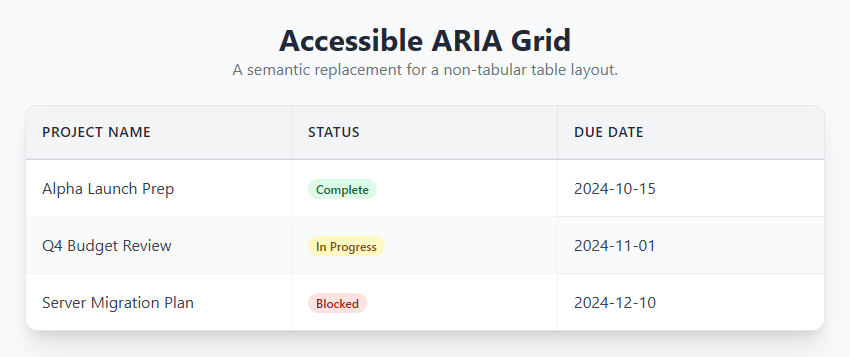
More robust models can undoubtedly offer significant assistance with these types of tasks.
Conclusion
While it may appear to be a trivial consideration amidst the complexities of JavaScript frameworks and intricate styles, consistent application of semantic HTML is paramount for developing superior web applications. This practice represents an investment that yields great returns in accessibility, SEO, maintainability, and overall code quality. It ensures that web applications are not merely aesthetically pleasing and functional, but also inclusive, and future-proof.
By adopting semantic HTML practices, we contribute to the construction of a more structured and accessible web for all.